Your campaign report: what each number means
The campaign report shows what happened to every email you sent: how many went out, how many were opened, what was clicked and who did not receive it. Here is what each number means and how to read it.
Screens are shown in the Hebrew interface. The English interface (app.mesereser.com) has the same layout and the same menu order.
Where to find the report
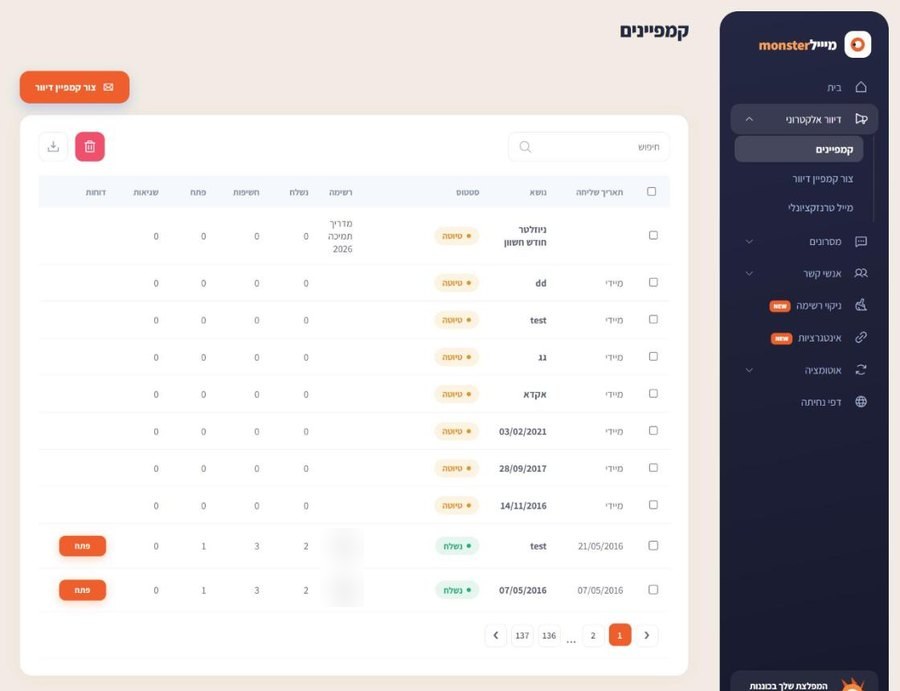
In the campaign list (Email, Campaigns), every sent campaign has an Open button in the Reports column.
What each number means
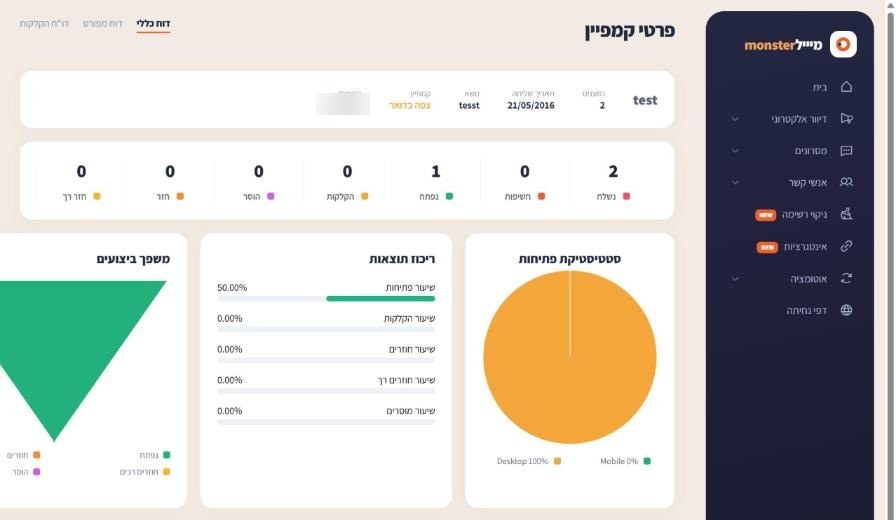
- Sent: how many emails went out to recipients on the list.
- Opened: how many recipients opened the email (measured by a tiny image loading in the email).
- Clicks: how many clicked a link. The Clicks report tab shows which link.
- Bounced: addresses that do not exist or were rejected permanently. They will not get your next campaigns.
- Soft bounce: a temporary rejection, for example a full mailbox. The system tries again in your next campaigns.
- Unsubscribed: recipients who clicked the unsubscribe link.
Why the open rate looks low
An open is counted only when the recipient's email program loads images. Many programs block images by default, and filtered or kosher devices often never load them. Real readership is therefore higher than the Opened column. Compare your campaigns with each other over time rather than with an absolute number.
Detailed report
The Detailed report tab lists every recipient and their status. To resend only to those who did not open, use the resend to recipients who did not open option on the last screen of the campaign wizard.
Frequently asked questions
Still need help?
Email support@meser10.co.il or WhatsApp +972 53-458-4334, Sunday to Thursday, 9:00 to 17:00 Israel time. Include your account number. All support guides