List cleaning: what it removes and how to run it
List cleaning checks every address before it gets an email and takes out what would hurt your sending: addresses that do not exist, spam traps, full mailboxes and mistyped domains. A clean list reaches the main inbox more often.
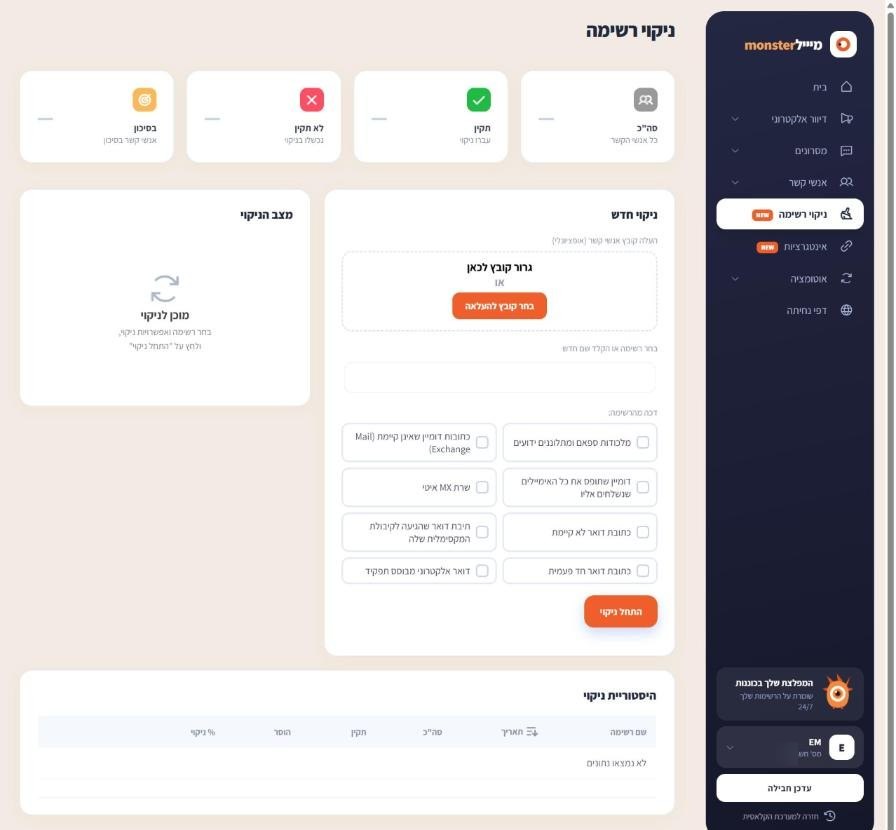
Screens are shown in the Hebrew interface. The English interface (app.mesereser.com) has the same layout and the same menu order.
Why clean
Every address that bounces or hits a spam trap damages your sending reputation, and in the end that hurts the real people on your list. Cleaning before a large send, and especially before the first send from an old or imported list, is the safe way to reach the inbox.
Run a cleaning
- In the menu choose List cleaning.
- Pick an existing list, or upload a contact file.
- Tick what to clean (you can tick all of them) and click Start cleaning. Progress shows under cleaning status and results in the cleaning history.
What each category removes
- Spam traps and known complainers: addresses used to detect spam senders.
- Domains that do not exist: a domain with no mail server at all, usually a typo.
- Address does not exist: the domain exists but the mailbox does not.
- Mailbox full: a mailbox that has reached its limit and does not accept mail.
- Catch-all domain: accepts any address, so there is no way to know if a person is there.
- Disposable address and role-based address (such as info@): addresses that usually do not belong to one person.
- Slow MX server: a mail server that does not answer in time.
Cleaning quota
Cleaning works against a cleaning quota on your account, shown on the home screen. If you have no quota, send us your account number and list size and we add it.
Frequently asked questions
Still need help?
Email support@meser10.co.il or WhatsApp +972 53-458-4334, Sunday to Thursday, 9:00 to 17:00 Israel time. Include your account number. All support guides