Reply-to address: where replies to your campaigns go
When a recipient clicks Reply on your campaign, the reply goes to the reply-to address. Here is where it is set, how to change it, and your options if you do not have a domain.
Screens are shown in the Hebrew interface. The English interface (app.mesereser.com) has the same layout and the same menu order.
The account reply-to address
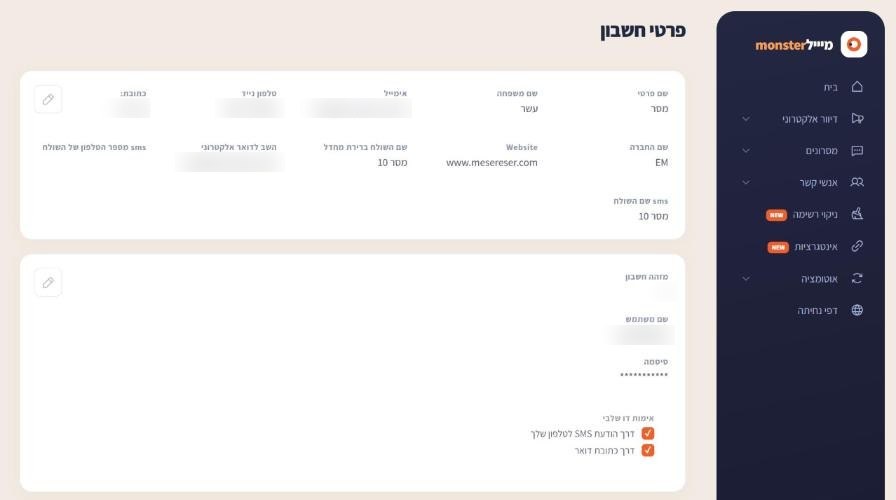
From the account menu choose Account details. The Reply to email field is the default reply-to address for all campaigns. Click the pencil to change it.
A different address for one campaign
You can set a different reply-to address for a specific campaign in the campaign settings, from the verified addresses on your account. A new address is verified once, through a link sent to it.
If you do not have your own domain
Sending from a Gmail address or another personal address tends to land in spam, because mailbox providers do not allow bulk systems to send in their name. There are two good options:
- Your organization's domain: send from an address on your domain. We send you the DNS records and you add them at your domain provider. Sender domain setup guide (Hebrew).
- A dedicated sender address from us: a verified address on our domain, including a reply address that forwards replies to your mailbox.
Frequently asked questions
Still need help?
Email support@meser10.co.il or WhatsApp +972 53-458-4334, Sunday to Thursday, 9:00 to 17:00 Israel time. Include your account number. All support guides